This set of scripts works on Mac OS X 10.4. I’d assume it will work fine on older versions of OS X, and even most variations of Linux/Unix. I’ve only tested this on OS X 10.4 and Red Hat Enterprise Linux release 3. I am planning on making a widget out of this.
Live365 makes available an interface that gives broadcasters information about their station. But you can only grab that information every six minutes. Any quicker than that and they may shut your station down!
- Open a Terminal window. Usually it is the “Terminal” application under Applications / Utilities.
- Make a new directory on your computer.
mkdir station-stats
- Change into that directory.
cd station-stats
- Create the get-info.sh script. Use a text editor, like vi. Copy and paste this information into the file:
#!/bin/sh site=YOURSTATIONNAME pw=YOURLIVE365PASSWORD timestamp=`date +%Y-%m-%d-%H-%M` filename=status-$site-$timestamp.txt curl -o $filename --silent http://tools.live365.com/cgi-bin/api_station_status.cgi?member_name=$site\&password=$pw\&action=listeners cat $filename | grep "^
" | sed 's/Current_listeners//g' | sed 's/\<\>//' | sed 's/\<\/\>//' | sed 's/^/Current Listeners: /' Save the file as get-info.sh. You will need to customize line 2 and 3 with your station’s information. The station is lowercase, the password is case sensitive.
- Create the loop-info-forever.sh script. This program will get your station statistics every 6 minutes.
#!/bin/sh clear while true do sleep 360 echo `date` `./get-info.sh` done - Make the two scripts executable (able to run) by typing this command:
chmod 755 *.sh
To get your station’s statistics, type ./get-info.sh. But only do this once every six minutes. It’s probably ok to do a few times while getting this set up, but don’t do it a bunch all at once.
To get your statistics throughout the day, simply open a Terminal window, change to the station-stats directory, and run ./loop-info-forever.sh. It will look like nothing is happening, but the script is waiting six minutes before getting the first status. You can copy and paste the results windows into a text file, and then run neat charts in Excel or ChartSmith or your statistical editor of choice.
I’ve actually added this to a cron job on a Red Hat server, so it will run every 10 minutes, giving me the status six times per hour. So I don’t need the loop-info-forever.sh script. I simply call the get-info.sh script and pipe the output into a file. /home/example/live365/get-info-cron.sh >>/home/example/live365/sitename-log.txt 2>&1
If you have trouble with any of this, feel free to contact me.
If you like this script, please give a listen to my stations, and add them to your presets:
- Christmas Music 24/7: Traditional Christmas music year-round
- Christmas Music 24/7: Jazz/Instrumental
- Christmas Music 24/7: Kids
- Christmas Music 24/7: Country
- Christmas Music 24/7: Contemporary Christian Music
- Christmas Music 24/7: Eclectic
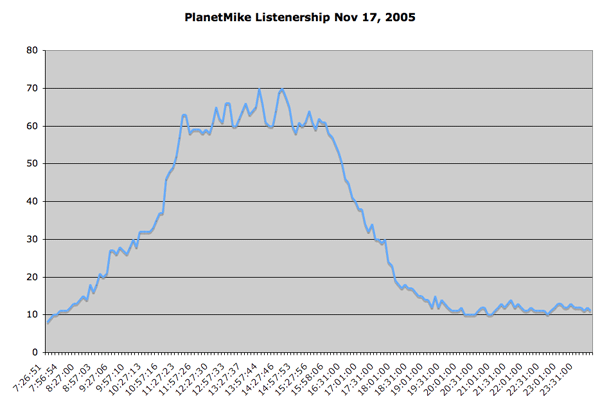
Here are PlanetMike’s stats from November 17, 2005:
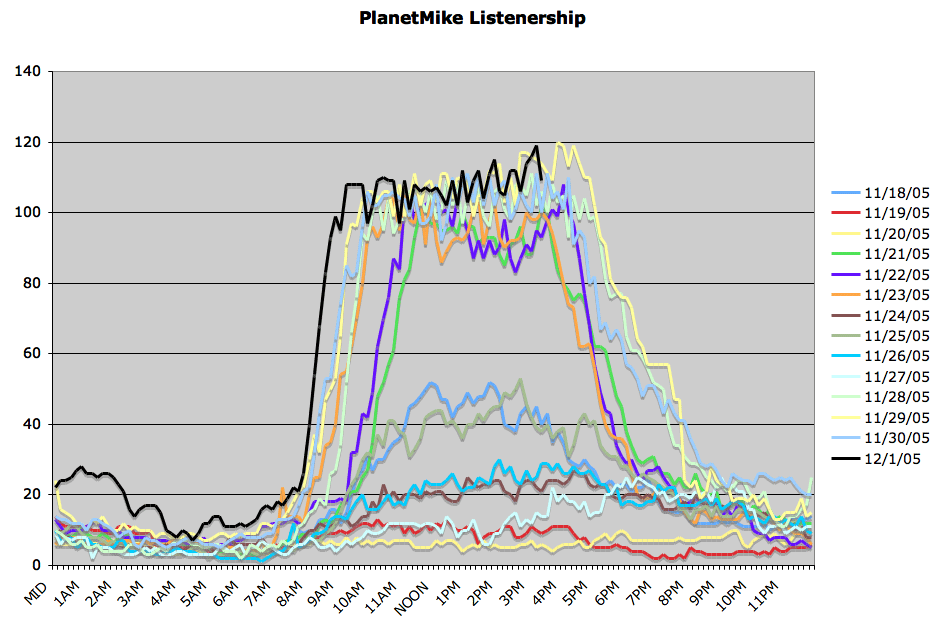
And several days worth of stats: